Speed
Speed is a US-based Bitcoin and stablecoin payment processor supporting on-chain and Lightning Network payments. It targets businesses that want a developer-friendly API alongside no-code tools like hosted checkout, payment links, invoices, and a web-based POS. Merchants settle in Bitcoin or can hold stablecoins; fiat conversion options are more limited compared to some competitors. The fee structure offers 0% on the first 0.5 BTC processed, then 1% thereafter.
API key for payinbtc.me
We assume you have a Speed account and it's already set up to suit your needs. If not, you have to do this first. After you have finalized setting up your Speed account you can continue with the steps below.
- Login to Speed
- In the menu on the left select Developers
- Click on the menu option API Keys and then on submenu item Restricted Keys
- Click on the button + Create Restricted Key
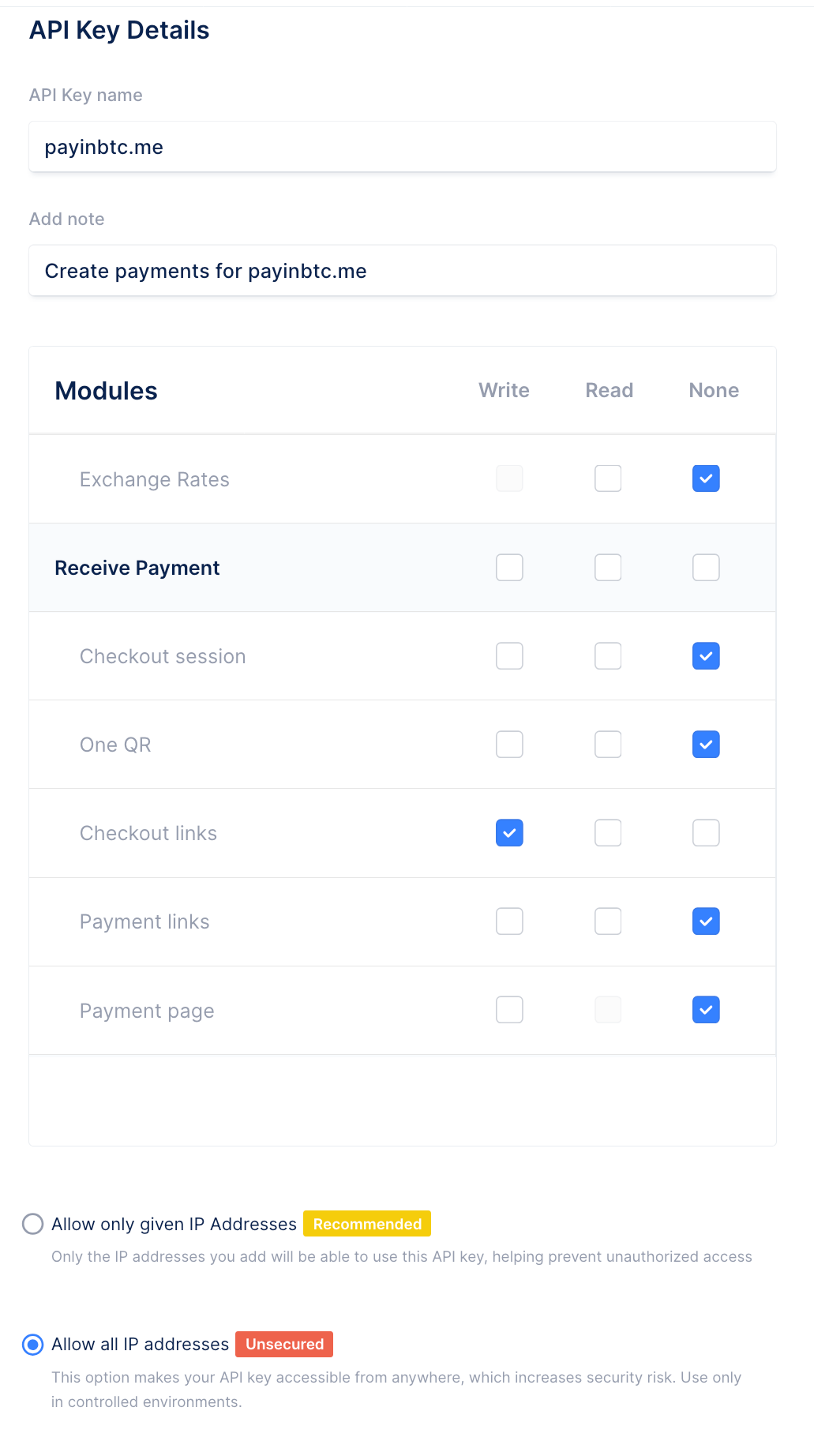
- In the popup window enter API Key name: payinbtc.me (or any name you like) and a short description in Add note
- In the Modules section check the Write checkbox for Checkout Links
- Below the Modules click on Allow all IP addresses
- The result should look like this:
- Press Done
- Confirm with your password
- The API key is shown
- 2Press the Copy button to copy the API key
- Share the generated API keys with us during the activation process